Everything AA
- 4.9
- Rating
- 500.00K
- Installs
- Free
- Price

 Analysis by App-foxy
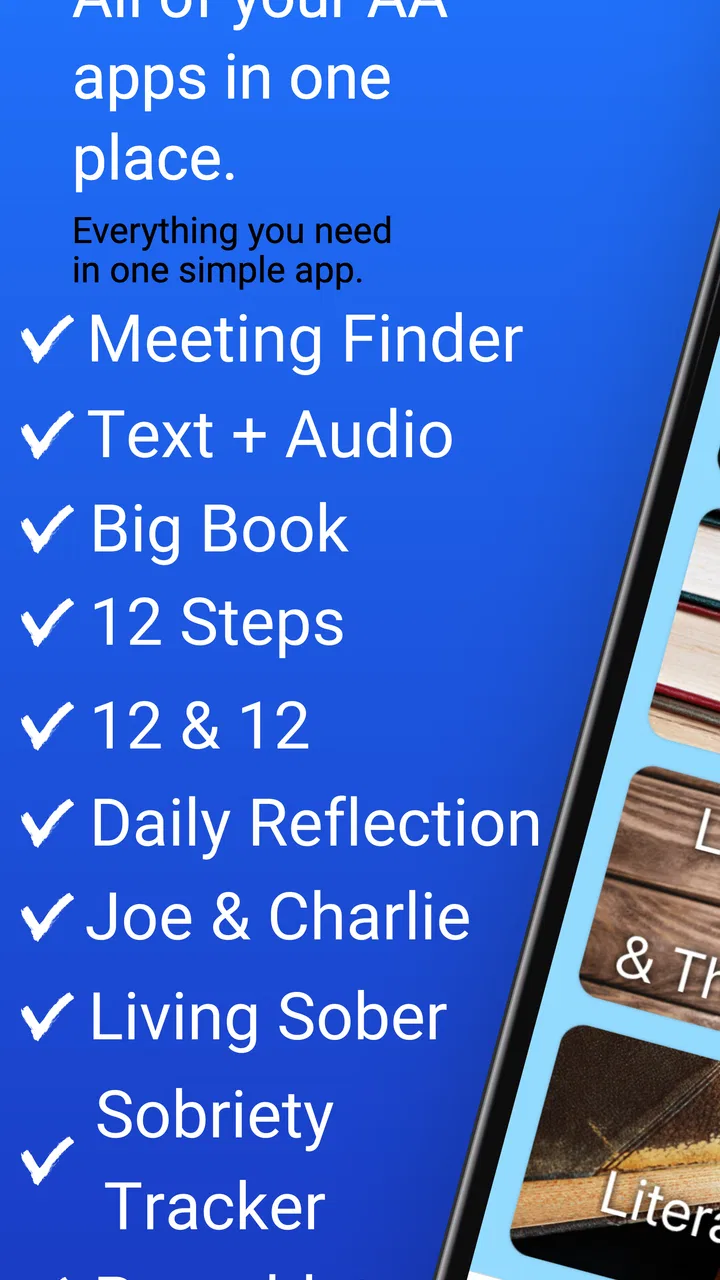
When I first opened Everything AA, I understood its appeal immediately: it tries to put the practical parts of Alcoholics Anonymous in one place instead of making me jump between a meeting directory, a book app, and separate daily-reading resources. It is a free lifestyle app from A.A. World Services, Inc., aimed at people who want AA material close at hand during ordinary moments, not only when they are sitting in a meeting.
That focus makes it different from a general wellness app. This is not a broad meditation tool, a sobriety counter, or a social network built around motivational posts. Its usefulness comes from bringing together meeting-finding tools, the Big Book, daily reflection material, and other AA resources. In my experience, that narrow purpose is its biggest strength: if AA is already part of your recovery routine, the app feels relevant from the first use.
The app is free to install, carries an Everyone 10+ content rating, and has built a strong reputation with a 4.9 average from around 26 thousand ratings. It has also passed half a million installs, which makes it easier to see why someone might consider it a dependable companion rather than an experimental download. Still, popularity does not automatically make an app suitable for every person, so I paid particular attention to how it behaves during quick checks, longer reading sessions, and moments when I needed information without extra friction.
You May Also Like

 Blood Strike: 2.5 Anniversary
Blood Strike’s Loadouts Turn Every Drop Into a Tactical Gamble
A close look at Blood Strike’s custom loadouts: how fast access to signature weapons reshapes its battle royale rhythm, rewards preparation, and narrows the gap between fights.

 Pandora - Music & Podcasts
Pandora’s Music Is Easy to Start, but Harder to Recover
Pandora’s strength is its low-effort path from a seed to a station. Its weak spot is how much confidence it asks you to place in connection, setup, and quiet recovery.

 8 Ball Pool
 Is Built on Rivalries, Rematches, and Routine
A close look at the rivalries, rematches, shared routines, and unanswered safety questions that turn a quick pool match into a persistent mobile community.

 Samsung Music
’s Quiet Strength Is Playing What You Already Own
Its reach comes less from spectacle than from dependable access to a personal library. That simplicity is both the app’s strongest retention engine and its ceiling.

 AccuWeather: Weather Radar
AccuWeather Review: A Quick, Clear Forecast for Everyday Decisions
For everyday plans, the best forecast is the one you can understand quickly. AccuWeather makes rain timing, radar, and local conditions easy to act on, with a few trade-offs.

 Hill Climb Racing
Why Hill Climb Racing Still Turns Crashes Into One More Run
A tiny car, a bumpy hill and one more upgrade: Hill Climb Racing keeps resurfacing because its simple chaos makes every near-miss feel personal.
More From Our News Desk
View All News


How Everything AA feels during everyday use
I find it useful to judge a recovery app not only by what it gathers, but by how deliberately I choose to use it. With Everything AA, I would make a quick habit of opening the section I need and closing the app when I’m done, rather than letting a sensitive moment turn into aimless phone browsing. That practical boundary leads to a closer look at the choices and trust considerations that matter around the material.
Quick access matters more than visual polish here
The first thing I noticed is that the app’s value depends on reducing the number of steps between a need and the relevant AA resource. If I want to look up a passage, read a daily reflection, or search for a meeting, I do not want to remember which separate service handles each task. Everything AA gives those activities a shared home, and that makes it especially practical when I am already distracted, tired, or in a hurry.
That does not mean every visit feels identical. Reading a long section of the Big Book is naturally a different task from checking a meeting option. The app works best when I treat it as a reference shelf rather than an entertainment app. I open it with a purpose, choose the relevant area, and leave once I have finished. That simple workflow also helps keep it from becoming another application that demands constant attention.
The most useful performance advantage is predictable access to familiar material, not flashy animation. A recovery resource should not make me wait through unnecessary presentation layers before I can read or search. Everything AA’s concept is strongest when it stays in the background and lets the content take priority.
What happens when I use several sections in one sitting
A realistic use case is an evening when I first look for a meeting, then read a short daily reflection, and finally spend more time with the Big Book. That kind of session places more demand on navigation than a single quick opening. I found the app easier to appreciate when I moved through it in that order because each section served a different purpose: planning, reflection, and deeper reading.
For heavy use, the main trade-off is attention rather than raw device power. Long reading sessions require patience, and switching between reference areas can interrupt concentration if I approach the app without a clear intention. My practical tip is to decide what I need before opening it. If the goal is a meeting, go directly to that task. If the goal is reading, avoid turning the session into an unplanned tour of every available resource.
This matters for people who use a phone with limited storage or an older operating system. The app supports Android 7.0 and later, so it is not restricted to only the newest phones. That broad compatibility is helpful, especially for users who keep an older device as a dedicated recovery or emergency phone. At the same time, compatibility should not be confused with identical performance on every handset; an older phone may feel less comfortable during extended reading or when several applications are open.
Stability is most important at the moment of need
For this kind of app, reliability is not just about whether it opens successfully. It is also about whether I can return to a useful resource without having to reconstruct my intention. A meeting search is valuable when it helps me act promptly. A reading tool is valuable when it lets me continue without needless disruption. Daily reflection is valuable when it becomes part of a routine instead of another task I postpone because the app feels complicated.
My overall impression is that the focused design gives Everything AA a sensible stability profile. There are fewer unrelated functions competing for attention than in a general-purpose community platform. That makes the app feel easier to understand and less likely to become cluttered with distractions. I would still keep another way to contact a local group if attending a meeting is urgent, because no app should be the only plan for an important real-world decision.
That is not a criticism unique to this product. Meeting information and local availability can change outside the app’s control. The useful habit is to treat the app as a starting point for finding the right resource, then confirm practical details when the situation requires certainty. This is one of the clearest examples of where convenience and real-world verification should work together rather than replace one another.
Device limits and reading comfort
Everything AA is more demanding on my attention than on the phone itself. The Big Book and other written material are comfortable for short or medium reading sessions, but a small screen is still a small screen. Someone who prefers printed pages, a tablet, or a large e-reader may find extended reading easier elsewhere. The app’s advantage is availability, not necessarily the most relaxing reading environment.
Screen size also affects how quickly I can scan information. On a compact phone, I am more likely to pause and scroll carefully. On a larger display, the same material feels less cramped. If I were choosing a device specifically for this app, I would prioritize a clear screen and comfortable text handling over high-end processing power. That choice reflects the app’s real use: reading and reference work are more central than demanding graphics.
Battery concerns are also best understood in context. A brief meeting search or daily reflection should not be treated like a long gaming session, but extended reading with the screen active is naturally more noticeable than a quick check. I would use normal phone habits here: lower brightness when comfortable, keep the device charged before leaving for a meeting, and avoid assuming that an app can solve every problem created by an aging battery.
A practical routine for people new to the app
If I were recommending Everything AA to a friend, I would suggest starting with one repeatable routine instead of exploring everything at once. For example, open the app at a consistent time, read the daily reflection, and use the meeting-finding area only when planning attendance. After that routine feels natural, the Big Book becomes easier to incorporate without turning the app into a source of information overload.
A second useful approach is to separate urgent and reflective use. When I need meeting information, I want direct action. When I want to read, I want fewer interruptions. Keeping those purposes mentally separate makes the app feel faster because I am not asking one session to do too many unrelated jobs.
A third tip is to use the app as a bridge to offline action. Read a passage, note the idea that matters, and then bring it into a conversation or meeting. The app is at its best when it supports real recovery habits rather than becoming a substitute for human contact. That distinction is important for anyone expecting an all-in-one digital community with live interaction built into every screen.
Who will benefit most from it
Everything AA is a strong match for people already familiar with Alcoholics Anonymous who want recognized AA-oriented material in a single mobile location. It is particularly useful for someone who travels, changes locations often, or does not want to carry printed material everywhere. It can also suit a person building a daily reading habit and wanting meeting information nearby when plans change.
It may be helpful for newcomers too, but I would not assume that a newcomer will immediately understand every reference or know which resource to open first. The app gathers material; it does not remove the need for guidance from a sponsor, group, or trusted person. A first-time user may get more from it after someone explains how the different parts fit into their routine.
The app is less suitable for someone looking specifically for a general mental-health platform, a private therapist, a sobriety-tracking dashboard, or a broad social feed. Those needs call for different tools. Everything AA’s focused approach is an advantage only when the user actually wants AA resources. If the goal is mood tracking, reminders, guided meditation, or personalized coaching, another category of app would likely be a better choice.
Free access, version details, and what to expect
The app is free, which removes the biggest barrier to trying it. There are in-app purchases ranging from $1.99 to $19.99 per item, so I would pay attention to any optional purchase prompt and decide whether it adds something I genuinely need. The free entry point is important because it lets users evaluate the core experience before committing money.
The current version is 4.00, and the app was released on May 16, 2021. Those details suggest a product with an established place in the mobile AA ecosystem rather than a brand-new experiment. I would still keep the app updated through the normal store process, because maintenance is especially important for a tool that people may depend on when they are away from home or following a regular reading routine.
On iOS or Android, the basic question is not whether the app replaces every other recovery resource. It does not. The better question is whether bringing these particular AA materials together makes daily access easier. For me, the answer is yes, provided I use it as a focused reference tool and keep real-world support at the center of the routine.
How it compares with usual alternatives
The usual alternative is a collection of separate solutions: a browser search for meetings, a digital book reader for the Big Book, and another source for daily reflections. That arrangement can work, but it creates more decisions and more opportunities to lose context. Everything AA’s main advantage is consolidation. I can move from one AA-related task to another without treating each one as a separate project.
Printed literature remains better for people who enjoy marking pages, avoiding screens, or reading without battery concerns. A local group or direct contact with another member is better when I need conversation, encouragement, or help interpreting a difficult situation. A general sobriety app may be better for tracking days, habits, or personal goals. The right choice depends on the job, and this app should not be judged as though it were designed for all of those jobs.
There is also a subtle privacy and attention trade-off in using a phone for recovery material. A phone is convenient, but it contains many distractions and can pull me away from the reason I opened the app. I get the best experience by turning the visit into a deliberate action: open the relevant section, read or search, and close the app when finished. That habit protects the usefulness of the tool better than endlessly browsing.
My performance verdict
After using Everything AA as a meeting reference and reading companion, I see it as a practical, focused lifestyle app rather than a complete replacement for AA participation. Its speed is most convincing during short, purposeful visits. Its heavier moments are long reading sessions and multi-step navigation, where screen comfort and personal organization matter more than processing power. Its reliability benefits from a narrow mission, while meeting details and personal support still require sensible real-world follow-through.
The strongest reason to install it is simple: it places several important AA resources within reach when carrying books or searching across unrelated services would be inconvenient. The strongest reason to skip it is equally clear: if you want coaching, tracking, therapy, or a broad social experience, this is not the right tool.
For someone who already values Alcoholics Anonymous and wants a free mobile companion for meetings, the Big Book, and daily reflection, I would recommend giving it a try. I would keep expectations realistic, use it intentionally, and treat it as support for a recovery routine rather than the routine itself. That balance is where Everything AA feels most useful: accessible when I need a resource, quiet when I do not, and specific enough to earn a regular place on my phone.
FAQs for Everything AA
01What is Everything AA and how does it work?
Everything AA is a comprehensive app designed to streamline your daily activities by providing tools for task management, scheduling, and reminders. It integrates seamlessly with your calendar and other productivity apps, allowing you to organize tasks efficiently. The intuitive interface ensures that users can easily navigate and utilize its features without a steep learning curve.
02Is Everything AA available on both Android and iOS platforms?
Yes, Everything AA is available for download on both Android and iOS platforms. The app offers a consistent user experience across devices, ensuring that you can manage your tasks and schedules whether you're using a smartphone or a tablet. Regular updates are provided to enhance functionality and compatibility.
03Does Everything AA support collaboration with other users?
Absolutely! Everything AA supports collaboration by allowing users to share tasks and schedules with others. You can invite friends, family, or colleagues to collaborate on specific projects or tasks, making it an ideal tool for team projects or family planning. The app provides real-time updates and notifications to keep everyone in the loop.
04What kind of customization options does Everything AA offer?
Everything AA offers a variety of customization options to suit individual preferences. Users can choose from different themes, color schemes, and notification sounds. Additionally, you can customize task categories and set personalized reminders, ensuring that the app fits seamlessly into your lifestyle and enhances your productivity.
05Are there any subscription fees or in-app purchases in Everything AA?
Everything AA operates on a freemium model. While the basic features are free, there are premium options available for users who require advanced functionalities. These may include enhanced collaboration tools, additional customization options, and priority support. Users can choose to purchase these features individually or through a subscription plan.
Pros
- User-friendly interface with intuitive design.
- Extensive library of resources and tools.
- Seamless integration with other platforms.
- Regular updates with new features.
- Responsive customer support team.
Cons
- Requires a stable internet connection.
- Subscription model can be costly.
- Limited offline functionality.
- Occasional minor bugs and glitches.
- Some features are paywalled.

Everything AA
Gallery